FaceTime uses about 250 MB of data per hour on a video call, and around 30 MB per hour on an audio-only call. On a fast 5G connection with a newer iPhone the video figure climbs toward 300 to 360 MB per hour, because the call streams in higher quality. That works out to roughly 3 to 4 MB per minute for video, and under 1 MB per minute for audio. So 1 GB of data covers about 4 hours of FaceTime video, or well over 30 hours of FaceTime audio. Group FaceTime uses more, since your phone sends and receives a separate video stream for every person on the call. And FaceTime always runs on data or WiFi, never on your call minutes, so on a weak signal or abroad it pulls straight from your mobile data plan.
If you make FaceTime calls while traveling, that data comes out of a roaming plan, which is where it gets expensive fast. Firsty gives you mobile data in 185+ countries, and the free plan costs nothing as long as you watch a short ad now and then.
Below is the full breakdown by call type, how far 1 GB really goes, how FaceTime stacks up against other apps, and the quickest ways to use less.
On this page
How much data does FaceTime use per hour?
A FaceTime video call uses about 250 MB per hour, and an audio-only call uses about 30 MB per hour. The exact number depends on your connection: a faster signal means higher video quality, which means more data. Here is the full breakdown, including how far 1 GB goes.
| FaceTime call type | Data per minute | Data per hour | What 1 GB gets you |
|---|---|---|---|
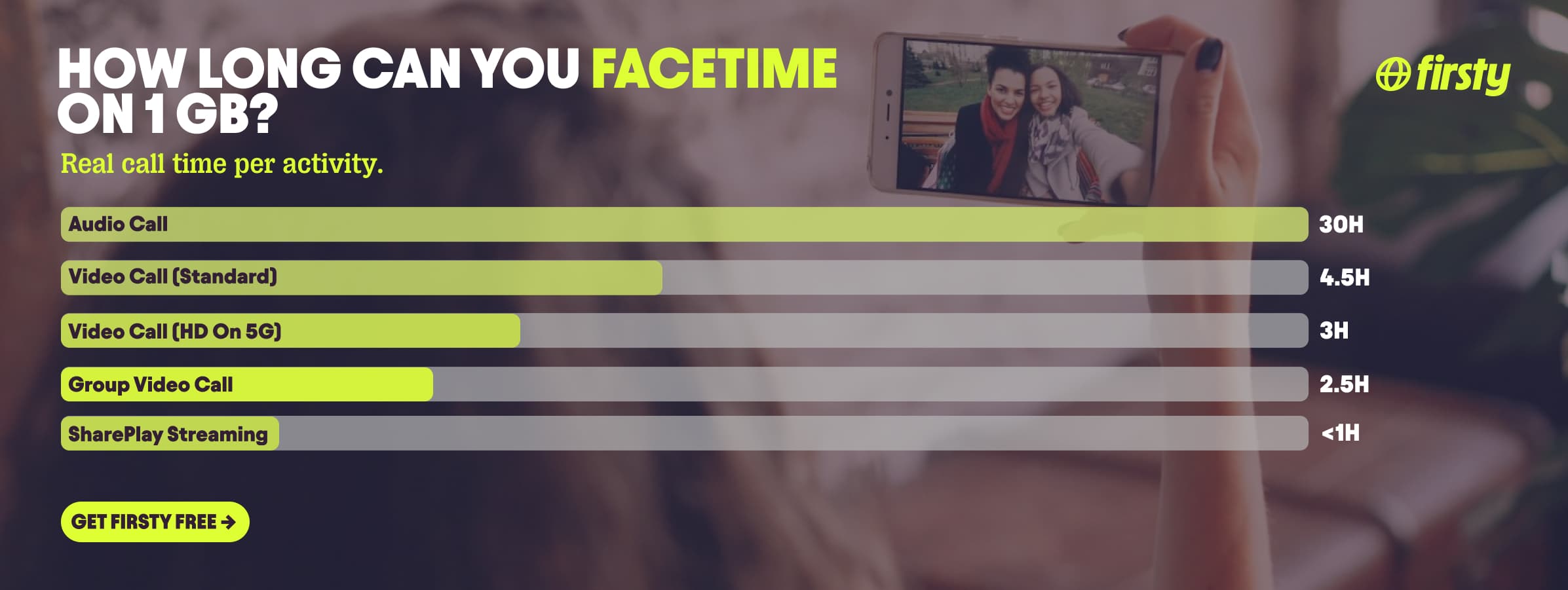
| Audio call | 0.5 to 1 MB | 30 to 60 MB | 17 to 33 hours |
| Video call (standard) | 3 to 4 MB | 180 to 250 MB | 4 to 5.5 hours |
| Video call (HD on 5G) | 5 to 6 MB | 300 to 360 MB | about 3 hours |
| Group video call | varies | adds 100+ MB per person | 2 to 3 hours |
A normal one-on-one video chat sits in the 180 to 250 MB range. The only time FaceTime gets genuinely data-hungry is a long HD call or a group call with several people on screen.
How long does 1 GB of data last on FaceTime?
1 GB of data lasts about 4 to 5 hours of FaceTime video, or more than 30 hours of FaceTime audio. Step up to 5 GB and you get roughly 20 hours of video or over 150 hours of audio. So if you mostly make audio calls, even a small allowance goes a long way. A heavy HD or group video caller will burn through 1 GB in an afternoon.
Does FaceTime use data or WiFi?
FaceTime uses WiFi whenever you're connected to it, and falls back to your mobile data the moment WiFi is off or too weak to hold the call. It never uses your call minutes or airtime, only an internet connection. That is the single most common point of confusion: a FaceTime call is not a phone call, so it costs data, not minutes.
On WiFi at home, FaceTime uses none of your mobile data. The problem starts when you leave the house or travel. Off WiFi, every minute pulls from your data plan, and abroad that means roaming rates. If you want to be safe, you can lock FaceTime to WiFi only, which is covered in the tips below.
Why does FaceTime use so much data?
FaceTime uses data because it streams live video and audio in both directions at the same time, and it automatically raises the quality when your connection is fast. A two-way HD video feed is simply a lot of information to send and receive every second. Group calls multiply this, because your phone handles a separate stream for each person, which is why a four-person group call can use two to three times the data of a one-on-one chat.
Make FaceTime calls abroad without burning your data plan
If you're traveling or worried about your monthly data cap, there's a simpler answer than counting megabytes.
Firsty Free gives you mobile data in 185+ countries by watching short ads. Genuinely free, no payment required, no contract, no credit check.
Classic starts at €0.98/GB, buy data once, use it whenever. GBs never expire.
Unlimited is €2 to €3 per day or €49 per month for genuinely uncapped data. Long FaceTime calls, group calls, HD video on 5G, none of it touches a cap.
Most travel data plans charge you €10 to €15 per day in roaming. Your home carrier charges similar. Firsty is the alternative.
Already have Firsty? Open the app, install the eSIM, and you're connected, no number changes, no SIM swap.
How does FaceTime compare to other apps?
FaceTime is one of the lightest video-calling options out there. A FaceTime video call uses less data per hour than WhatsApp, Zoom, or Teams, and far less than full-screen video like YouTube or Netflix. It only climbs into heavier territory on long HD calls or group calls with several people on screen.
| App | Data per hour (heavy use) | Data per hour (light use) |
|---|---|---|
| FaceTime | ~250 MB (video call) | ~30 MB (audio call) |
| Snapchat | ~360 MB (Stories, Spotlight) | ~20 MB (chat only) |
| TikTok | ~840 MB | ~280 MB |
| Netflix | 3 GB (1080p HD) | 300 MB (Save Data mode) |
| YouTube | 1.5 GB (720p) | 90 MB (144p) |
| Zoom / Teams | ~1.1 GB (1-on-1 HD video) | ~50 MB (audio only) |
| ~720 MB (scrolling) | n/a | |
| 480 MB (video call) | n/a | |
| Spotify | 150 MB (Very High audio) | 40 MB (Normal audio) |
| Google Maps | ~20 MB (satellite view) | ~5 MB (navigation) |
Want the full picture for the other apps eating your data? Check the breakdowns for YouTube, Netflix, TikTok, Instagram, WhatsApp, Snapchat , Spotify , Zoom, and Google Maps. FaceTime stays lighter than the video-heavy ones for everyday calls, but a long HD or group FaceTime closes the gap fast.
How to reduce FaceTime data usage
Switch to a FaceTime audio call when you don't need to see each other. That alone drops usage from about 250 MB to about 30 MB per hour.
Turn off Wi-Fi Assist. This is the one most people miss. When your WiFi stutters for even a second, your iPhone quietly tops up the call with mobile data, so you burn data even at home. Go to Settings, Cellular, scroll all the way past your app list to the very bottom, and toggle off Wi-Fi Assist.
Turn on Low Data Mode. On a 5G iPhone, go to Settings, Cellular, Cellular Data Options, Data Mode, then pick Low Data Mode. On older iPhones it's a direct toggle in the same Cellular Data Options screen. FaceTime will stream at a lower quality and use noticeably less.
Or just cap your 5G quality. If you don't want full Low Data Mode but still want to stop 5G guzzling data, open the same Data Mode screen and switch from Allow More Data on 5G to Standard. Your phone stays fast, but FaceTime stops jumping to HD.
Turn your camera off mid-call. Tap the screen, then tap the camera icon to stop sending video. You keep talking, but the heavy video stream stops.
Block FaceTime over cellular entirely. Go to Settings, Cellular, scroll to FaceTime, and toggle it off. Now it only works on WiFi, so it can never touch your data plan by accident.
Avoid group FaceTime on mobile data. Each extra person adds another video stream, which is the fastest way to drain a plan.
How to check FaceTime data usage on iPhone and Android
On iPhone, you can see exactly how much data FaceTime has used. Open Settings, tap Cellular or Mobile Data, then scroll down to FaceTime in the app list. The number shown is the data used since your last reset. To start fresh, scroll to the bottom and tap Reset Statistics.
FaceTime isn't a downloadable app on Android, so there's nothing to check directly. Android users can only join a FaceTime call through a browser link an iPhone user sends them. To see what that used, open Settings, then Network and internet or Connections, then Data usage, and check your browser, usually Chrome.
Frequently asked questions
Does FaceTime use a lot of data?
Not compared to other video apps. A FaceTime video call uses about 250 MB per hour, less than half what a WhatsApp or Zoom video call uses. Audio-only calls use about 30 MB per hour, which is tiny. It only becomes data-heavy on long HD calls or group calls.
How much data does a 2 hour FaceTime call use?
A 2 hour FaceTime video call uses roughly 500 MB, about half a gigabyte. The same call in audio only would use around 60 MB. On a fast 5G connection in HD, expect closer to 600 to 720 MB across the two hours.
How long will 5 GB of data last on FaceTime?
5 GB covers about 20 hours of FaceTime video, or more than 150 hours of FaceTime audio. If you mostly make audio calls, 5 GB will last weeks of regular use.
How much data does FaceTime audio use?
FaceTime audio uses about 30 to 60 MB per hour, or 0.5 to 1 MB per minute. That's roughly a tenth of what video uses, so switching to audio is the fastest way to save data on a long call.
Does FaceTime use more data than WhatsApp?
No. A FaceTime video call uses about 250 MB per hour, while a WhatsApp video call uses around 480 MB per hour. FaceTime is the lighter option for video, though both drop sharply if you switch to audio only.
Can you FaceTime without data or WiFi?
No. FaceTime needs an internet connection, either WiFi or mobile data, to connect at all. It doesn't use your call minutes, so with no data and no WiFi the call won't go through.
Does FaceTime use your call minutes or your data?
FaceTime always uses data, never your call minutes or airtime. On WiFi it uses no mobile data at all. Off WiFi it pulls from your mobile data plan, which is exactly why it can get expensive on roaming abroad.
Does screen sharing or SharePlay use more data on FaceTime?
Screen sharing uses about the same as a video call, roughly 250 MB per hour. SharePlay is heavier: when you watch Netflix or listen to Apple Music together, the content streams to each person's own device from the app, not through FaceTime, so you pay your normal streaming cost on top, and a Netflix HD stream alone can run 1 to 3 GB per hour.