Spotify uses about 11 MB to 144 MB per hour, depending on your audio quality. On Low it is roughly 11 MB per hour, Normal is about 43 MB, High is about 72 MB, and Very High is about 144 MB. Two settings break that range: the new Lossless tier and video podcasts both use up to 1 GB per hour. For most people on Normal or High, an hour of music costs somewhere between 40 and 75 MB, which is light next to video apps, so a full day of background listening on Normal still stays under 1 GB. The biggest factor is the quality setting you pick, and you control that in the app. Downloads change the math too: once a song is saved offline, playing it uses no data at all.
If you listen while traveling, the data itself is cheap but roaming is not. Firsty gives you mobile data in 185+ countries, starting free by watching a short ad, so you can stream without a roaming bill.
Here is the full breakdown, how long 1 GB lasts, why the number climbs, and how to cut it down:
How much data does Spotify use per hour?
Spotify uses about 11 MB per hour on Low and up to 144 MB per hour on Very High. Here is every quality setting, its bitrate, and the data it uses for one hour of streaming:
| Quality setting | Bitrate | Data per hour |
|---|---|---|
| Low | 24 kbps | ~11 MB |
| Normal | 96 kbps | ~43 MB |
| High | 160 kbps | ~72 MB |
| Very High | 320 kbps | ~144 MB |
| Lossless | ~1,000+ kbps | up to ~1 GB |
Two things sit outside the normal range. Spotify Lossless streams in FLAC and can use up to 1 GB per hour, and video podcasts also pass 1 GB per hour because they stream picture as well as sound. Audio podcasts use about the same as music at the same quality. Per song, a typical four-minute track uses roughly 0.7 MB on Low, 2.9 MB on Normal, 4.8 MB on High, and 9.6 MB on Very High.
Does Spotify use a lot of data?
No, Spotify does not use a lot of data compared to most apps. At Normal quality it uses about 43 MB per hour, which is less than a tenth of what Netflix or YouTube burn through on video. Listening for an hour a day on Normal adds up to roughly 1.3 GB a month. The only time Spotify gets heavy is on Very High, Lossless, or video podcasts, where it can match or beat video streaming. For everyday listening, it is one of the lighter apps on your phone.
How long does 1 GB of data last on Spotify?
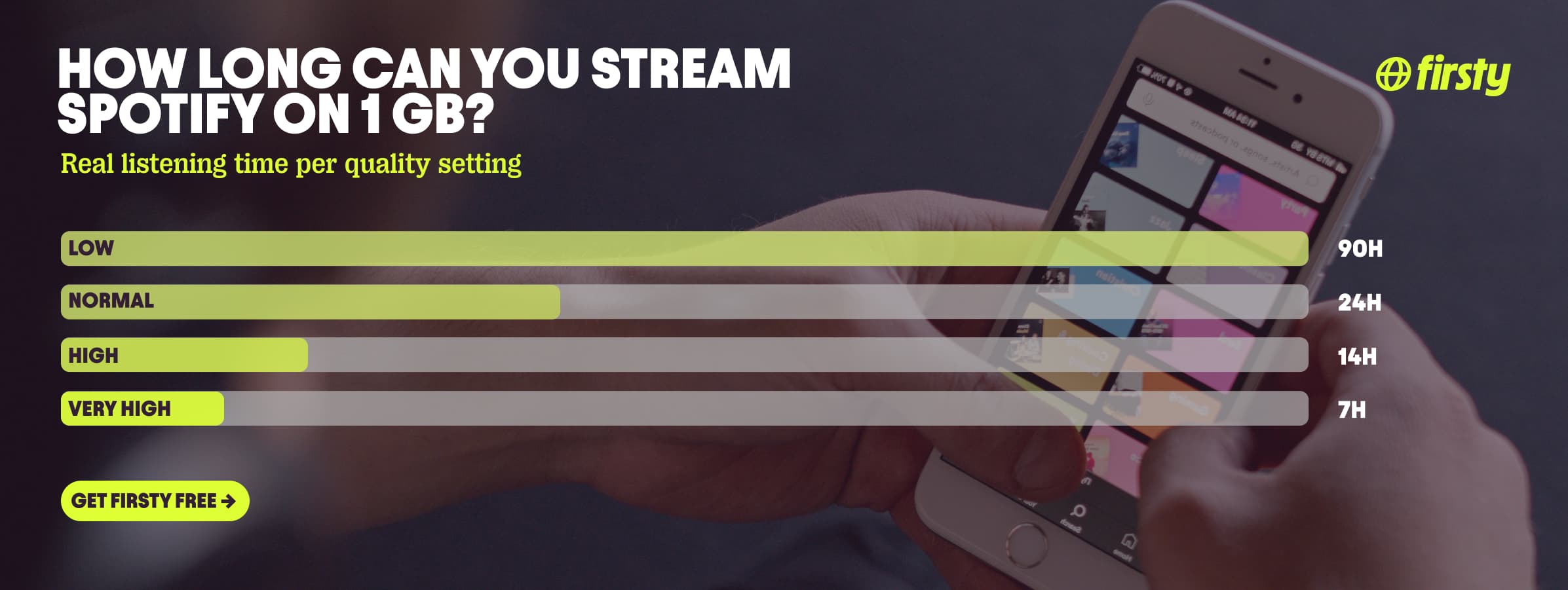
1 GB of data gives you roughly 90 hours of Spotify on Low, 24 hours on Normal, 14 hours on High, or about 7 hours on Very High. Here is how far 1 GB stretches at each quality:
| Quality setting | Hours of Spotify on 1 GB |
|---|---|
| Low | ~90 hours |
| Normal | ~24 hours |
| High | ~14 hours |
| Very High | ~7 hours |
So if you listen on Normal, 1 GB covers about a full work week of eight-hour listening days. On Lossless or video podcasts, that same 1 GB lasts only about an hour, which is worth knowing before a long trip.
Why does Spotify use so much data?
Spotify uses data because it streams audio in real time, and the higher the quality, the more data every second of playback needs. A few features push it higher than you would expect: Canvas adds short looping videos to some tracks, Autoplay keeps streaming new songs after your playlist ends, and video podcasts plus the Lossless tier multiply the load. If your usage looks high, one of these is usually the reason, and each one can be switched off.
Stream Spotify abroad without burning your data plan
If you're traveling or worried about your monthly data cap, there's a simpler answer than counting megabytes.
Firsty Free gives you mobile data in 185+ countries by watching short ads. Genuinely free, no payment required, no contract, no credit check.
Firsty Prepaid starts at €0.98/GB, buy data once, use it whenever. GBs never expire.
Firsty Unlimited is €2 to €3 per day or €49 per month for genuinely uncapped data. Stream on Very High or Lossless all day and never think about your data again.
Most travel data plans charge you €10 to €15 per day in roaming. Your home carrier charges similar. Firsty is the alternative.
Already have Firsty? Open the app, install the eSIM, and you're connected, no number changes, no SIM swap.
How does Spotify compare to other apps?
Spotify sits at the light end. An hour of music uses a fraction of what video apps like YouTube, Netflix, and TikTok burn through, and on Normal quality it is lighter than a video call too. It only climbs into video territory if you switch on Lossless or play video podcasts.
| App | Data per hour (heavy use) | Data per hour (light use) |
|---|---|---|
| Spotify | ~144 MB (Very High) | ~43 MB (Normal) |
| Snapchat | ~360 MB (Stories, Spotlight) | ~20 MB (chat only) |
| TikTok | ~840 MB | ~280 MB |
| Netflix | 3 GB (1080p HD) | 300 MB (Save Data mode) |
| YouTube | 1.5 GB (720p) | 90 MB (144p) |
| Zoom / Teams | ~1.1 GB (1-on-1 HD video) | ~50 MB (audio only) |
| ~720 MB (scrolling) | n/a | |
| 480 MB (video call) | n/a | |
| FaceTime | ~250 MB (video call) | ~30 MB (audio call) |
| Google Maps | ~20 MB (satellite view) | ~5 MB (navigation) |
Want the full picture for the other apps eating your data? Check the breakdowns for YouTube, Netflix, TikTok, Instagram, WhatsApp, Snapchat , FaceTime, Zoom, and Google Maps. Spotify stays lighter than all the video-heavy ones for everyday listening, but a Lossless session or a video podcast closes the gap fast.
How to reduce Spotify data usage
The fastest way to cut Spotify's data use is to turn on Data Saver, which drops the streaming quality and strips out visuals automatically. Here are the most effective steps, in order:
Turn on Data Saver. Open Settings, then Data Saver, and switch it on. This caps quality at Low and disables Canvas videos.
Lower your streaming quality manually. In Settings, then Media quality, set streaming to Normal or Low. This alone can cut your usage by more than half.
Download playlists on Wi-Fi. Premium lets you save music offline, and playing downloaded songs uses no data at all.
Turn off Canvas. In Settings, switch off Canvas to stop the looping videos on tracks.
Turn off Autoplay so Spotify does not keep streaming extra songs after your playlist ends.
Skip Lossless and video podcasts on mobile data. Both can use up to 1 GB per hour, so save them for Wi-Fi.
Set a sleep timer at night so music does not stream for hours while you sleep.
How to check Spotify data usage on iPhone and Android
You can see exactly how much data Spotify has used in your phone settings, not inside the app. Here is where to look on each:
On iPhone: open Settings, tap Mobile Data (or Cellular), scroll to the list of apps, and find Spotify to see how much it has used since the last reset.
On Android: open Settings, tap Network & Internet or Connections, then Data usage, then Mobile data usage, and select Spotify to see its usage over a chosen period.
To track a fresh number, reset your statistics at the start of a billing cycle or trip, then check back later.
Frequently asked questions
Does Spotify use data when playing downloaded songs?
No. Once you download a song, album, or playlist over Wi-Fi, playing it offline uses zero data. Only the initial download uses data, so save downloads for Wi-Fi. Downloading is a Premium feature.
Does Spotify Premium use less data than Free?
Spotify Premium and Spotify Free use the same data per hour at the same quality, so the numbers above apply to both. The difference is that Free plays audio ads, which use a little extra data, and only Premium can download for offline listening or stream Very High and Lossless. So Premium gives you more ways to cut data, not a lower rate.
How much data does Spotify use per month?
It depends on how long you listen and at what quality. One hour a day on Normal is about 1.3 GB a month, on High about 2.2 GB, and on Very High about 4.3 GB. Drop to Low or rely on downloads and you can stream daily on well under 1 GB a month.
How much data do Spotify podcasts use?
Audio podcasts use about the same as music at your chosen quality, so roughly 43 MB per hour on Normal. Video podcasts are the exception and can use over 1 GB per hour because they stream picture too. Switch to audio-only playback to keep them light.
What uses more data, Spotify or YouTube?
YouTube uses far more. YouTube streams video, so even at 720p it uses around 1.5 GB per hour, while Spotify on Very High uses about 144 MB. For the same hour, Spotify uses roughly a tenth of YouTube's data. They only get close if you play Spotify video podcasts or stream in Lossless.
How do I stop Spotify from using so much data?
Turn on Data Saver in Settings, which instantly drops quality to Low and switches off Canvas videos. For zero data use, download your music on Wi-Fi and listen offline. Avoiding Very High, Lossless, and video podcasts on mobile data keeps your usage low.
How much data does Spotify use per song?
A typical four-minute song uses about 0.7 MB on Low, 2.9 MB on Normal, 4.8 MB on High, and 9.6 MB on Very High. So 100 songs on Normal is under 300 MB, and at Low quality you could stream more than 1,000 songs on a single GB.