Zoom uses about 540 MB per hour for a one-on-one call in standard definition, around 1.08 GB per hour at 720p HD, and up to 1.62 GB per hour at 1080p. Group calls cost more: roughly 810 MB per hour in SD, 1.35 GB at 720p, and up to 2.5 GB per hour for an HD group call with everyone's camera on. Audio-only is the cheapest at about 30 MB per hour, and screen sharing adds only 20 to 70 MB per hour. So a typical hour-long work meeting in HD lands somewhere between 1 GB and 2.5 GB depending on group size. On mobile data, a few HD group calls a week will eat into a capped plan fast.
Worried about burning through your plan on calls abroad? Firsty Free gives you mobile data in 185+ countries by watching a short ad, so an audio-only Zoom catch-up can cost you nothing.
Below you get the full per-hour breakdown, how far 1 GB actually goes on Zoom, why it uses what it does, and the settings that cut your usage the most.
On this page:
How much data does Zoom use per hour?
A one-on-one Zoom video call uses about 540 MB per hour in SD and up to 1.62 GB per hour in 1080p, while an HD group call can reach 2.5 GB per hour. Audio-only is the lightest by far. Here's the full per-hour breakdown by call type and quality:
| Call type | 480p (SD) | 720p (HD) | 1080p (Full HD) |
|---|---|---|---|
| One-on-one video | ~540 MB/hr | ~1.08 GB/hr | ~1.62 GB/hr |
| Group video | ~810 MB/hr | ~1.35 GB/hr | ~2.5 GB/hr |
| Audio only | ~30 MB/hr | n/a | n/a |
| Screen sharing | 20 to 70 MB/hr | n/a | n/a |
The 2.5 GB figure is the worst case: a 1080p group call with every camera on. Most everyday calls sit lower, and Zoom drops quality automatically when your connection is weak, so real usage is often less than the table suggests.
How long does 1 GB of data last on Zoom?
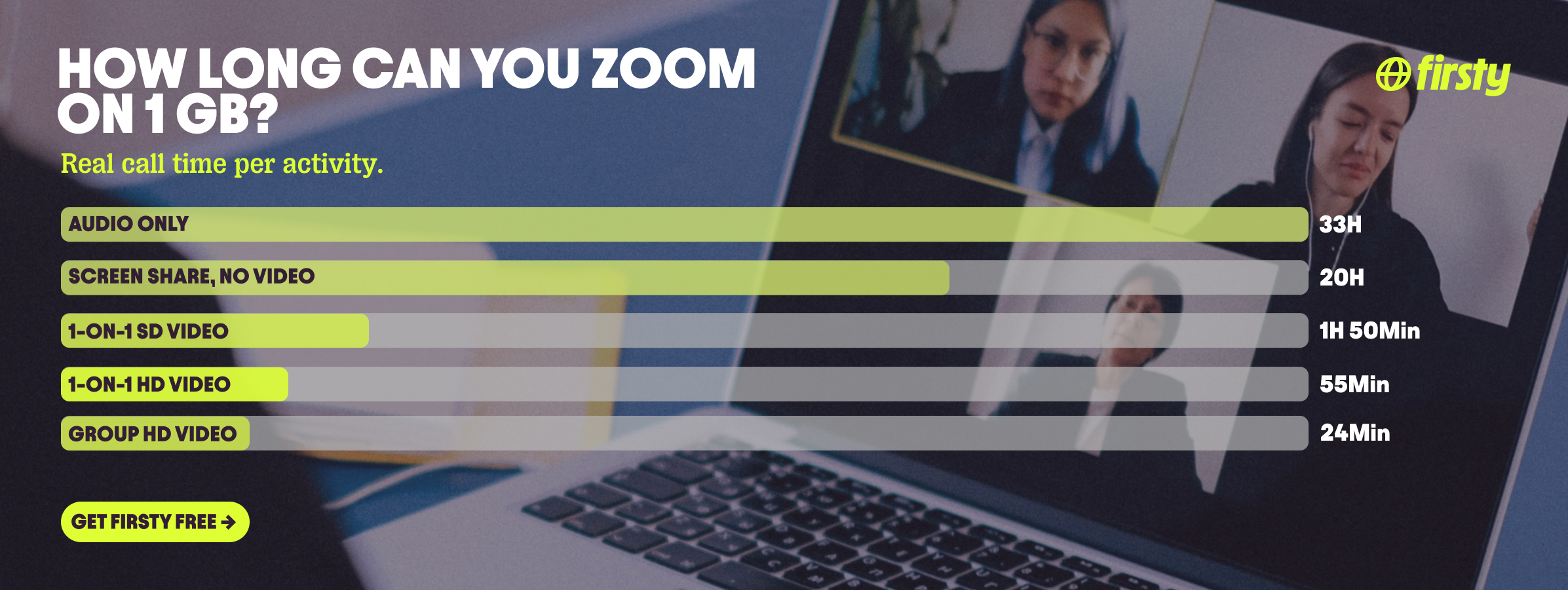
1 GB of data lasts about 33 hours of audio-only Zoom, just under 2 hours of a one-on-one SD video call, or only about 25 minutes of an HD group call. Here's how 1 GB breaks down by activity:
| Zoom activity | How long 1 GB lasts |
|---|---|
| Audio only (~30 MB/hr) | ~33 hours |
| Screen sharing, no video (~50 MB/hr) | ~20 hours |
| One-on-one SD video, 480p (~540 MB/hr) | ~1 hour 50 min |
| One-on-one HD video, 720p (~1.08 GB/hr) | ~55 minutes |
| Group HD video, 1080p (~2.5 GB/hr) | ~25 minutes |
The takeaway: if you're tight on data, audio-only stretches 1 GB across a full work week of calls, while one HD group meeting can swallow it before lunch.
Why does Zoom use so much data?
Zoom uses data because it sends and receives a live video and audio stream for every person on the call, in both directions. Four things push usage up the most: video resolution (1080p can be triple the data of 480p), the number of participants (every extra camera is another stream your phone downloads), screen sharing, and gallery view, which loads everyone's video at once instead of just the active speaker. Virtual backgrounds and HD mode add a little more on top. Turn those down and your usage drops fast, which is exactly what the tips further down cover.
Make calls on Zoom abroad without burning your data plan
If you're traveling or worried about your monthly data cap, there's a simpler answer than counting megabytes.
Firsty Free gives you mobile data in 185+ countries by watching short ads. Genuinely free, with no payment required, no contract and no credit check.
Firsty Prepaid starts at €0.98/GB, buy data once, use it whenever. GBs never expire.
Firsty Unlimited is €2 to €3 per day or €49 per month for genuinely uncapped data. Run back-to-back HD group calls all day without watching the meter.
Most travel data plans charge you €10 to €15 per day in roaming. Your home carrier charges similar. Firsty is the alternative.
Already have Firsty? Open the app, install the eSIM, and you're connected, no number changes, no SIM swap.
How does Zoom compare to other apps?
Zoom sits at the heavier end of everyday apps. For a one-on-one call it's lighter than full-screen video like Netflix and YouTube, but heavier than messaging, music, and navigation. It closes that gap fast though: turn on HD and fill the screen with a gallery-view group call and Zoom hits Netflix territory at around 2.5 GB per hour.
| App | Data per hour (heavy use) | Data per hour (light use) |
|---|---|---|
| Zoom | ~1.1 GB (1-on-1 HD video) | ~30 MB (audio only) |
| Snapchat | ~360 MB (Stories, Spotlight) | ~20 MB (chat only) |
| TikTok | ~840 MB | ~280 MB |
| Netflix | 3 GB (1080p HD) | 300 MB (Save Data mode) |
| YouTube | 1.5 GB (720p) | 90 MB (144p) |
| ~720 MB (scrolling) | n/a | |
| 480 MB (video call) | n/a | |
| FaceTime | ~250 MB (video call) | ~30 MB (audio call) |
| Spotify | 150 MB (Very High audio) | 40 MB (Normal audio) |
| Google Maps | ~20 MB (satellite view) | ~5 MB (navigation) |
Want the full picture for the other apps eating your data? Check the breakdowns for YouTube, Netflix, TikTok, Instagram, WhatsApp, Snapchat , FaceTime, Spotify, and Google Maps. Zoom stays lighter than the video-streaming apps for a quick one-on-one, but a long HD group call closes the gap on Netflix fast.
How to reduce Zoom data usage
The fastest way to cut Zoom data is to turn off HD video and switch to audio only when you can, which drops an hour from over 1 GB down to about 30 MB. Here are the settings that help most:
Turn off HD video. In Settings, then Video, uncheck Enable HD. This alone can roughly halve a video call's usage.
Go audio-only when you can. Stopping your camera (and asking others to) cuts an HD call from about 1 GB to about 30 MB per hour.
Switch from gallery view to speaker view. Loading one active video instead of a full grid means fewer streams to download.
Avoid screen sharing unless you need it, and share a single window rather than your whole screen.
Skip virtual backgrounds and "Touch up my appearance." Both add processing and a little data.
Dial in by phone for audio-heavy meetings. Calling the meeting's phone number uses no mobile data at all.
On mobile data, set a lower video quality before the call starts rather than scrambling mid-meeting.
How to check Zoom data usage on iPhone and Android
You can see exactly how much data Zoom has used in your phone's settings, no extra app needed.
On iPhone: Open Settings, then Mobile Data (called Cellular in some regions). Scroll down to the app list and find Zoom to see the mobile data it has used since your last reset. Tap Reset Statistics at the bottom at the start of each billing cycle for an accurate monthly figure.
On Android: Open Settings, then Network and internet, then SIMs (or Mobile network), then App data usage. Find Zoom in the list to see its usage over your chosen period, and tap it for a split between Wi-Fi and mobile data.
Frequently Asked Questions
How much data does a 1-hour Zoom call use?
A one-hour Zoom call uses about 540 MB in standard definition, around 1.08 GB at 720p HD, and up to 1.62 GB at 1080p for a one-on-one. A one-hour HD group call can reach 2.5 GB. Switch to audio only and that same hour drops to about 30 MB.
How much data is needed for a 30 minute Zoom call?
A 30-minute Zoom call uses roughly half the hourly figure: about 270 MB for a one-on-one SD video call, around 540 MB at 720p HD, and up to 1.25 GB for an HD group call. Audio only is about 15 MB for the half hour.
How many GB does a 2 hour Zoom meeting use?
A two-hour Zoom meeting uses about 1.1 GB in SD, roughly 2.2 GB at 720p HD, and up to 5 GB for a 1080p group call. A three-hour meeting scales the same way, so an HD group call over three hours can pass 7 GB. Keep it audio only and two hours stays under about 70 MB.
How much data does Zoom use without video?
With your camera off, Zoom uses about 30 MB per hour for audio only, roughly 100 times less than an HD video call. If you're screen sharing without your camera on, expect about 20 to 70 MB per hour depending on how much the screen changes. Turning off video is the single biggest data saver on Zoom.
Does Zoom have a time limit?
Yes. Zoom's free Basic plan limits meetings to 40 minutes, including one-on-one calls, after which the call ends and you restart it. Paid plans remove the cap. The limit is about meeting length rather than data, but it does mean a free-plan meeting rarely uses more than about 1.5 GB in one sitting.
Does Zoom work without Wi-Fi?
Yes, Zoom works over mobile data, and you can also dial into a meeting by phone for audio only, which uses no data at all. Over mobile data an HD call can use 1 GB or more per hour, so watch your plan or stick to audio only. Abroad, that's where roaming charges add up fast, which is where a free or prepaid eSIM helps.
Does Zoom use more data than Google Meet?
They're close. Zoom and Google Meet both use roughly 0.5 to 2.5 GB per hour for video depending on quality and group size, with audio-only on either app around 30 MB per hour. Zoom's HD group calls can edge slightly higher, but for everyday calls the difference is small. Your video quality setting matters far more than which app you pick.